Evaluating the Pure Blue Color PSD 3D Text Effect for Professional Design Workflows
In the landscape of digital graphic design, typography is rarely just about selecting a font and applying color. It is about creating depth, texture, and visual hierarchy that captures attention in a crowded media environment. For designers working within Adobe Photoshop, achieving a high-quality three-dimensional text appearance often requires a steep learning curve involving layer styles, gradient maps, and manual shading techniques. This is where specialized resources like the Pure Blue Color PSD 3D Text Effect enter the workflow as practical tools for efficiency and consistency.
This resource is not merely a static image; it is a functional template designed to streamline the creation of glossy, volumetric text. By leveraging smart objects and pre-configured layer styles, it offers a rapid alternative to building complex 3D effects from scratch. However, understanding its specific capabilities, limitations, and ideal use cases is essential before integrating it into a broader design strategy. This analysis explores how this effect fits into modern design practices, comparing its utility against manual methods and other asset categories.
Understanding the Mechanics of the Effect
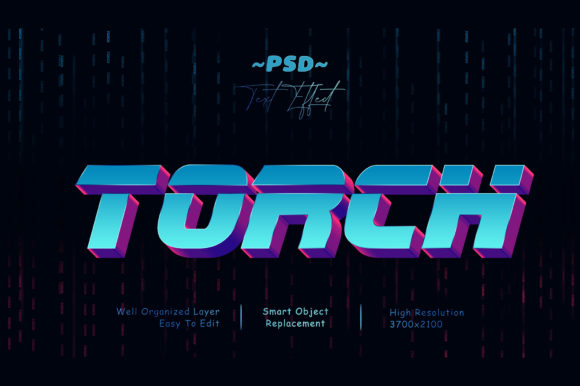
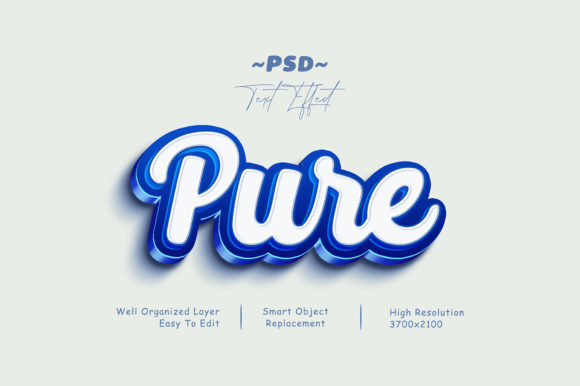
The core value proposition of the Pure Blue Color PSD 3D Text Effect lies in its technical architecture. Unlike standard PNG overlays or simple drop-shadow presets, this file utilizes Photoshop’s Smart Object functionality. This distinction is critical for professional workflows because it preserves non-destructive editing capabilities. When a designer opens the file, they are presented with a well-organized layer structure that isolates the text rendering engine from the content itself.
To utilize the effect, the process is straightforward but requires adherence to specific steps:
- File Preparation: The user opens the main PSD file in Adobe Photoshop.
- Smart Object Activation: Double-clicking the layer labeled "Your Text" opens a new document window containing the editable text element.
- Content Replacement: The designer types their desired copy, adjusts kerning, or changes the font family within this isolated environment.
- Synchronization: Upon saving (Cmd+S / Ctrl+S) and closing the smart object window, the main file automatically updates to reflect the new text with the full 3D blue effect applied.
This mechanism ensures that the intricate lighting, bevels, and reflections associated with the "Pure Blue" aesthetic remain intact regardless of the text length or character count. For users unfamiliar with smart objects, this feature represents a significant advantage over older methods that required manually duplicating layer styles across multiple lines of text.
Comparative Analysis: Templates vs. Manual Creation
When evaluating the Pure Blue Color PSD 3D Text Effect, it is helpful to compare it against two primary alternatives: manual layer style construction and generic 3D text generators found in other software.
Manual Layer Styles
Building a similar 3D effect manually involves stacking multiple layer styles such as Bevel and Emboss, Inner Shadow, Gradient Overlay, and Drop Shadow. While this method offers total control over every nuance of the light source and material properties, it is time-intensive. A designer might spend twenty minutes perfecting a single word. In contrast, the Pure Blue template reduces this process to seconds. The tradeoff here is flexibility versus speed. If a project demands a unique, one-off typographic treatment that deviates significantly from standard glossiness, manual creation may still be preferable. However, for bulk content creation, the template is superior.
Generic 3D Generators
Many online tools offer instant 3D text generation using WebGL or AI-driven interfaces. These tools often produce flat images or low-resolution outputs suitable only for web previews. The Pure Blue PSD file, being a native Photoshop document at high resolution, allows for print-ready output and further manipulation. Users can adjust the opacity of individual layers, change the hue of the blue gradient, or add additional textures on top of the base effect. This level of granular control is absent in most automated generators, making the PSD resource a more robust choice for professional deliverables.
Ideal Use Cases and Application Scenarios
The versatility of the Pure Blue Color PSD 3D Text Effect makes it suitable for a wide array of digital and physical media. Its clean, high-contrast aesthetic aligns well with modern UI/UX trends and promotional materials. Below are specific scenarios where this resource demonstrates particular strength.
Digital Social Media Assets
Social platforms like Facebook, YouTube, and Twitter require eye-catching headers to stand out in fast-scrolling feeds. The glossy, reflective nature of the pure blue effect draws the eye effectively. Because the file is high-resolution, it scales appropriately for various cover dimensions without pixelation. Designers creating content for gaming channels, tech reviews, or corporate announcements can use this effect to establish a sense of authority and modernity.
Promotional Banners and Flyers
In banner promotions, readability is paramount. The 3D extrusion provided by the effect adds physical presence to the text, separating it from background imagery. This is particularly useful when placing text over busy or colorful backgrounds. The deep blue tones provide excellent contrast against lighter palettes, ensuring legibility. For flyers and placards, the effect can elevate a simple headline into a focal point, reducing the need for excessive graphical embellishments around the typography.
Merchandise and Apparel Design
For T-shirt designs and clothing graphics, the durability of the design file is important. Since the PSD includes organized layers, designers can isolate the text shape for vector export if needed, or simply use the high-res raster version for direct printing. The "cartoon title" or "movie title" aesthetic suggested by the product description lends itself well to streetwear branding or event merchandise, where bold, impactful lettering is desired.
Evaluation of Features and Limitations
A balanced assessment must consider both the strengths and the constraints of the resource. Understanding these factors helps designers decide if it fits their specific project requirements.
Key Strengths
- Editability: The inclusion of a Read Me file and clear layer naming conventions reduces the barrier to entry for junior designers. The 100% editable nature means the effect is not a locked-down preset.
- Organization: Well-organized layers prevent file bloat and confusion. This is crucial when merging the effect into larger composite designs.
- Resolution: High-resolution output ensures the asset performs well in both digital displays and large-format prints.
Potential Limitations
While versatile, the effect is stylistically specific. The "Pure Blue" theme may not suit projects requiring warm tones, metallic finishes, or organic textures. Designers seeking a rustic, hand-drawn, or minimalist aesthetic would find this resource mismatched with their goals. Additionally, reliance on a single color palette limits customization unless the user has advanced skills in adjusting gradient maps and hue/saturation layers. It is a tool for a specific look, not a universal solution for all typographic needs.
Decision Factors for Implementation
Choosing whether to incorporate the Pure Blue Color PSD 3D Text Effect into your workflow depends on several decision factors. First, consider the volume of text-based assets you produce. If you frequently create social media headers or promotional banners, the time saved by using a smart object template likely outweighs the cost of acquisition. Second, evaluate your current skill level with Photoshop layer styles. For beginners, this resource serves as an educational tool, allowing them to inspect how professional 3D effects are constructed through the layer stack.
Furthermore, assess the compatibility of the effect with your brand identity. Does the cool, glossy blue tone align with your client’s or personal brand colors? If yes, the integration will be seamless. If your brand relies on earth tones or monochrome schemes, you may need to invest time in recoloring the gradients, which could diminish the efficiency gains. In such cases, purchasing a neutral or multi-color variant might be a more strategic investment.
Conclusion on Resource Utility
The Pure Blue Color PSD 3D Text Effect stands out as a practical, efficient resource for designers who prioritize speed without sacrificing quality. Its reliance on smart objects and organized layers reflects best practices in digital asset management. While it does not replace the need for foundational design knowledge or custom illustration work, it fills a specific niche for high-impact, glossy typography. By understanding its applications in social media, print media, and merchandise, designers can make informed decisions about when to deploy this tool. Ultimately, it serves as a valuable component in a diversified toolkit, offering a reliable solution for common typographic challenges while leaving room for creative adaptation.